ADHD-Specific App Design Criteria That Prevent Abandonment
Design choices that prevent ADHD users from abandoning productivity apps.
Roughly 15.5 million adults in the country carry an ADHD diagnosis as of the CDC's 2024 MMWR data, and about half of them found out as adults, often after years of downloading productivity apps that never stuck. This piece looks at why those apps fail, not in the vague sense of "they didn't work for me," but in the specific, structural sense: which design choices ignore how executive dysfunction actually operates, and which ones work with it. The goal here is not another list of apps to try. It's a way of understanding the mechanics well enough that a reader can look at any new app and predict, within a few minutes of use, whether it will survive contact with a bad week.
The pattern is familiar enough to be almost a rite of passage. A habit tracker opened for eleven days straight, then never again. Three timer apps, forgotten, still sitting on a home screen doing nothing. A task manager from a couple years back, abandoned somewhere around the third missed streak. None of that is a personal failing. It's a predictable outcome of software built on assumptions that don't hold for the ADHD brain, and one health authority has put a number on what that costs: workers with ADHD lose an average of 22 excess days of productivity a year compared to their peers, not from missing work, but from the quieter, harder-to-see struggle with starting tasks and staying engaged once they've started.
What executive dysfunction does to the user experience of an app
Russell Barkley's model of ADHD reframes the condition as a self-regulation problem rather than a pure attention deficit, and that reframe matters enormously for app design. An app that substitutes external structure for the internal regulation an ADHD brain has trouble generating on its own tends to help. An app that just adds more decisions to make tends to hurt, even when those decisions are framed as customization or flexibility.
Four executive function deficits shape this most directly. Working memory is measurably tighter in adults with ADHD compared to neurotypical adults, alongside deficits in inhibition and planning, so any workflow requiring someone to hold several steps in mind at once starts to collapse before it even gets going. Time blindness, a term CHADD attributes to Barkley, is not a minor quirk either: research on adult ADHD time perception finds unmedicated adults show an effect size of d = 0.83 on time-estimation error, which is a substantial, measurable neurological difference, not a scheduling habit that just needs more willpower.
Task-switching compounds the cognitive burden already present for the ADHD brain: an interface that forces someone to move between capturing a task, planning it, and reviewing it, each in a different mode or screen, adds friction at every step. ADHD energy fluctuates day to day, sometimes hour to hour, so rigid daily structures tend to snap the first time a bad day occurs. Lower dopamine availability compounds this further: tasks without an immediate payoff can feel uninteresting or, more accurately, almost invisible to the brain trying to prioritize them. That's a real mechanism behind task paralysis, not evidence of laziness.
What follows from all this is a fairly clean design implication. The app needs to act like an external frontal lobe, doing some of the sequencing and prioritizing work a neurotypical brain does automatically, rather than functioning as an expectation machine that assumes the user will supply that structure themselves. The fewer decisions an app demands before it delivers value, the better it fits how this brain actually works. None of this makes the ADHD brain broken. It makes it different in specific, well-documented ways, and the tools either respect that difference or they don't.
The abandonment cycle and the design decisions that drive it
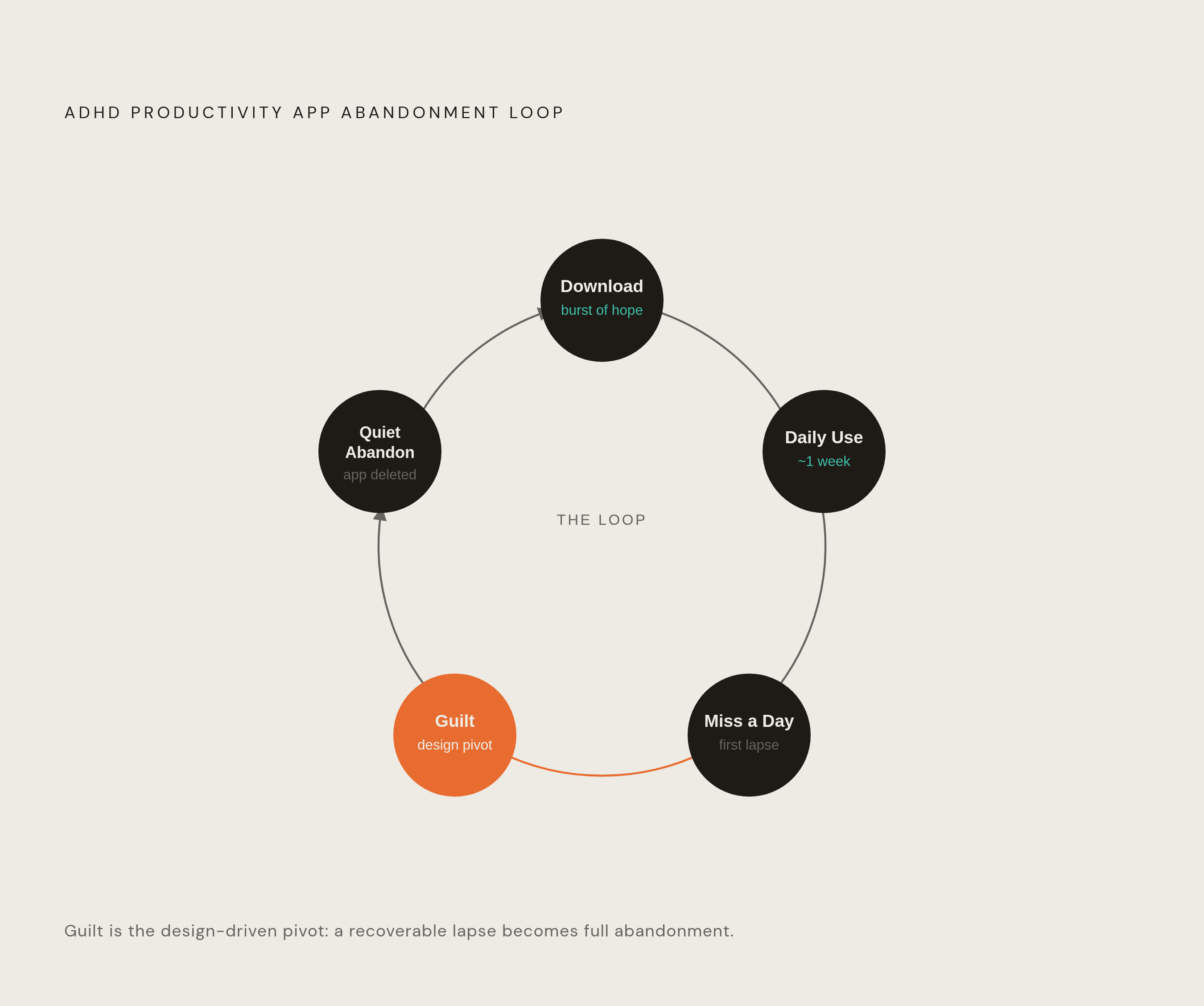
The cycle itself is almost embarrassingly predictable once it's laid out. Download, feel a burst of hope, use the app for a week or so, miss a day, feel guilty about missing it, then quietly stop opening it. That's not a character flaw. It's the direct consequence of software designed around consistent daily engagement, applied to a brain whose engagement is not consistent by nature.
Onboarding is often the first place this goes wrong. Setup that runs too long tends to lose ADHD adults before they've captured a single real task, and the apps that hold on to users are the ones that work the moment they're opened, with little or no configuration required up front. The ones that get abandoned early are the ones asking someone to tune a dozen settings before the app has proven it's worth the effort.
Cognitive overload is a second, related trigger. A cluttered interface spikes distractibility rather than reducing it. Notification volume that's meant to be helpful ends up being one more thing pulling attention sideways. Rigid, one-path structures don't accommodate the flexible, associative thinking a lot of ADHD adults rely on to get things done.
Then there's the guilt loop, which is really a design problem wearing the costume of a personal one. Apps that break a streak visibly, or send notifications with a shame-coded undertone about a missed day, make an already bad day worse and push abandonment closer. The "everything app" trap makes this harder to spot: apps promising to solve all of productivity at once tend to get dropped, while apps that address one specific gap (task initiation, working memory, time perception, motivation) tend to stick around. Most adults probably need only one or two ADHD-specific apps total. Stacking five of them doesn't add coverage, it adds cognitive load, which is exactly the thing all of them were supposed to reduce.
What separates the apps that survive is resilience baked into the design itself: gentle re-engagement after a gap instead of silence or shame, persistent but non-punitive reminders, and a return experience that feels neutral or even good rather than like walking back into a room you got scolded in. Handling bad days well isn't a bonus feature. It's close to the core of what retention means for this population.
The non-negotiable structural features ADHD-retaining apps share
A short list of structural features appears again and again across the apps that manage to hold on to ADHD users past the first month, and they function almost like a checklist.
Low-friction entry comes first. Capturing a task should take one or two taps, full stop. Voice input that skips the menu-navigation step, a lock-screen widget that opens straight to capture, no mandatory setup gate before the first real use, these all matter because if adding a task takes more than two taps, the ADHD brain tends to skip it. That's not laziness, it's cognitive load landing on a working memory that's already stretched thin.
Visual time representation matters just as much, maybe more. Time blindness makes an abstract list of tasks close to useless, because the list doesn't answer the question that actually matters: what's happening when, how long will it take, when will it be done. Color, icons, and visible timelines aren't decoration here. They're accessibility features doing real cognitive work.
Task breakdown needs to live inside the interface itself, not sit off to the side as an optional step. Large, vague tasks trigger avoidance rather than motivation, a phenomenon commonly described as task paralysis, the feeling of being mentally stuck rather than simply unmotivated. Apps that let someone break a task into granular subtasks, or that do the breaking-down automatically, tend to keep the very next concrete action visible at all times, which is often the difference between starting and not.
Reset mechanics need to be forgiving. An app that flags an overdue task in red, or that breaks a streak outright rather than letting it soften and recover, punishes exactly the kind of fluctuation that's normal for this brain. Minimal UI clutter follows the same logic UDL (Universal Design for Learning) principles lay out: clean, multi-modal representation of information, because a crowded dashboard tends to trigger paralysis rather than action.
Progress needs to be visible without tipping into overstimulation, which is a genuinely tricky balance. Immediate positive feedback, whether that's a small reward, a bit of gamification, or just a satisfying visual checkmark, keeps people coming back. The design challenge is delivering that dopamine hit without burying the screen in notifications that undo the calm the rest of the interface worked to build. And an external accountability layer, something like body doubling, or visible progress another person can see, taps into the dopamine-motivation pathway more directly than a plain checklist ever will. CHADD describes body doubling as a technique some adults use specifically to help start and finish tasks, which lines up with what the neuroscience of ADHD motivation would predict.
How gamification works on the ADHD brain and where it goes wrong
Dopamine is the neurotransmitter doing most of the work in reward, attention, and motivation, and ADHD brains tend to have less of it available for that job. That's the mechanism behind why a task with no immediate payoff can feel almost impossible to start, even when someone genuinely wants to do it. Gamification steps into that gap by manufacturing an external reward that mimics the internal motivation signal the brain has trouble producing on its own.
The evidence for this isn't overwhelming: meta-analyses of gamified digital interventions for ADHD report an effect size around Hedges' g = 0.28 on symptom improvement. Meta-analyses of gamified digital interventions for ADHD report an effect size around Hedges' g = 0.28 on symptom improvement, with computer-based formats that allow for deeper immersion showing somewhat stronger results. That's a modest number, not a dramatic one, but it's more clinical grounding than most consumer apps in this space can claim.
Personalization turns out to matter even more than the gamification mechanics themselves. Personalized ADHD apps show retention rates 39% higher than generic, one-size-fits-all versions, which tracks with a fairly intuitive idea: personalization builds a sense of ownership, and ownership is what keeps someone opening an app past the novelty phase.
A handful of specific mechanics do the heaviest lifting. XP and reward loops, where even small actions like brushing teeth earn points, deliver a real dopamine hit that helps bridge the gap between intending to do something and actually doing it. Streak mechanics, the kind apps like Duolingo and Fabulous use with badges and unlockable content, build momentum by rewarding consecutive days rather than punishing broken ones. Adaptive difficulty, where a smart system adjusts challenge level in real time, keeps a user in the zone where a task feels achievable but not trivial. EndeavorRx is a clear example of this, adjusting its in-game challenges dynamically based on how the user is performing in the moment. Loss-avoidance mechanics work too, at least for some people: Forest's approach of threatening a virtual tree's life if someone leaves the app mid-focus-session hits a sweet spot between gentle accountability and outright pressure for a meaningful chunk of ADHD users.
But gamification cuts both ways, and this is where a lot of otherwise well-intentioned apps go sideways. A streak system with no forgiveness mechanic built in can trigger the exact same shame-guilt-abandonment cycle any punitive design produces, gamified or not. Group accountability features, guilds, shared progress boards, the like, can backfire just as easily: showing up as the one who didn't show up can trigger a shame response that outweighs whatever motivational benefit the feature was meant to deliver. Social pressure isn't inherently helpful just because it's social.
The design principle that falls out of all this is fairly clean: gamification built for ADHD has to pair reward loops with real forgiveness mechanics. Momentum needs a path back after a bad day, or the whole system becomes one more thing working against the user instead of for them.
Six apps that apply these criteria in different ways, and what each one does well
None of this is a ranked list. It's grouped by function, because the honest answer to "which ADHD app is best" is that it depends entirely on which specific friction point is causing the most trouble. Worth repeating from earlier, most people need one or two of these total, not five running in parallel.
Best visual planner for time blindness goes to an app built around color-coded visual timelines specifically for neurodivergent brains, recognized with an App of the Year award in 2025. It's available on iOS, Android, and web, priced free or around $4.50 a month on an annual plan (or $12 monthly), and it earns its spot by tackling time blindness head-on, making the day something you can actually see rather than a list of abstractions with no sense of duration attached.
Best for timeline day view is a visual day planner with a clean, uncluttered timeline that makes a full schedule feel manageable rather than overwhelming. It runs on iOS, Android, Mac, and web, free or around $6.49 a month, and it holds a 4.8 out of 5 rating. Its strength is visual structure paired with low clutter, which directly answers the minimal-UI criterion from earlier.
Best for AI-powered task breakdown belongs to an app centered on a "Magic To-Do" feature: an AI task splitter that takes an overwhelming project and turns it into small, doable steps automatically. Available on iOS, Android, and web, free or a few dollars for the paid app, it holds a 4.8 rating and addresses task paralysis directly, keeping a visible next action in front of the user instead of a wall of undifferentiated work.
Best for focus and distraction blocking combines habit tracking, a timed focus session with ambient soundscapes, and screen-time blocking in one place. It's built for iOS, iPad, Mac, and Vision Pro, free with a Pro upgrade running from roughly $1.99 to $89.99, and carries a 4.9 rating, the highest of the group. What sets it apart is that it doesn't stop at organizing tasks. It actively blocks the distractions that get in the way of doing them, which is a different, arguably harder problem than scheduling.
Best for guided morning routines offers step-by-step routine timers that walk a user through each task in sequence, built specifically with time blindness in mind. It's on iOS, Android, and web, free or about $7.99 a month, rated 4.5, and it reduces decision load by sequencing everything so there's never a question of what comes next, which matters most exactly when mornings are hardest, a point the next section digs into further.
Voice-first, AI-powered scaffolding tools form a distinct category, separate from the four mechanisms. A review of 45 peer-reviewed studies on generative AI and ADHD identifies four mechanisms these tools use, cognitive scaffolding through pattern recognition, task decomposition, real-time contextual support that cuts attention-switching costs, and personalized systems that adapt to how a given person's ADHD actually presents. Voice input in particular strips out a huge amount of friction before a single feature even gets used, since talking naturally replaces typing into a form, and typing into a form is one of the highest-friction moments in most task-capture flows for ADHD users. AI companions that break a goal into milestones and hand out XP for progress are applying the same gamification science covered above, just with voice capture layered on top as one more way to lower the barrier to entry.
Morning routines as a design test case: where app criteria meet daily life
Mornings compress nearly every ADHD vulnerability into a single, short window, which makes them a useful stress test for whether an app's design actually holds up outside a calm, hypothetical use case. Executive function governs planning, organization, time management, and impulse control, and every one of those plays a role in getting through the first hour of a day. When all four are needed at once, under time pressure, with no margin for error, weaknesses in an app's design become visible fast.
Sleep adds another layer that most productivity advice ignores. Roughly 60 to 70% of adults with ADHD deal with chronic sleep issues, including insomnia, a delayed sleep phase, and dysregulated melatonin, according to research on the condition. That means the transition from asleep to awake is already a task-initiation problem before the actual morning routine even starts. The hardest task of the day, for a lot of ADHD adults, might genuinely be waking up in a state where any subsequent task feels possible.
Sensory processing complicates the picture further. A 2025 meta-analysis pulling from 30 studies found individuals with ADHD show significantly higher rates of sensory processing differences compared to the general population, and mornings are dense with sensory input: the texture of clothing, the temperature of a shower, the sound of an alarm, the light through a window. None of that is trivial when a nervous system processes sensory information differently than average, and an app that assumes a smooth, sensory-neutral morning is quietly assuming something that isn't true for a large share of its users.
This is exactly where the structural criteria from earlier stop being abstract and start being tested in real time. A guided routine timer that sequences each morning step removes decision-making at the exact moment decision-making is hardest. Visual time representation answers the question of how long getting dressed actually takes, when time blindness makes that question genuinely unanswerable from memory alone. Low-friction task capture matters if something unexpected comes up mid-routine and needs to get logged without derailing the whole sequence. Forgiving reset mechanics matter most of all here: if the routine breaks on a bad morning (and it will, on some mornings), the app needs to let the day continue without treating the break as a failure worth punishing.
The morning, in other words, is where every design principle discussed so far either proves itself or falls apart. An app that survives a rough morning without adding guilt on top of it has, in a fairly concrete sense, done the one thing generic productivity software has never managed to do for this population.